Analyzing Bloat
Browse docs
One of the most annoying experiences for a user is seeing a program be larger than feels warranted. Ie, 300mB “hello world” programs due to electron.
Hence, tooling for developers to identify what is making your programs larger is essential.
lde bloat
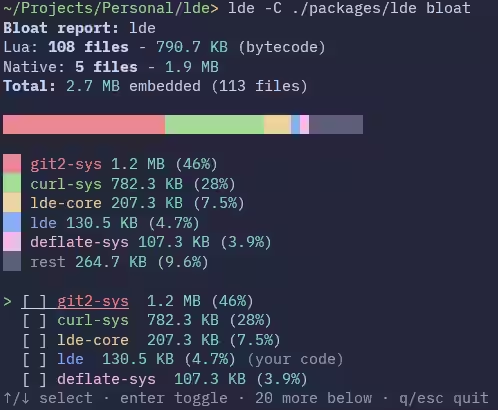
This command compiles your project and gives you an interactive TUI showing graphical representation of what makes up the compiled binary, being your own code, your dependencies, and the luajit library itself.
Basic usage
lde bloatHere’s an example of the TUI output, run on lde itself:
Now we can press enter on the curl-sys library to figure out why its so large:
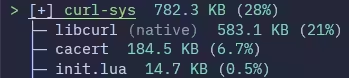
As we can see, the size is from an unavoidable embedded native library being linked in.
JSON report
You can also get a JSON report of the bloat analysis, which is useful just for extracting pure data for llms or record keeping.
lde bloat --json